

Easily Download Deezer Music to Lossless FLAC
Deezer offers millions of tracks, including lossless audio for eligible subscribers. While Deezer Premium lets you download songs for offline listening, those downloads remain encrypted and can't be accessed as standard FLAC files. If you'd like to keep your favorite songs permanently, transfer them to other devices, or build a local music library, converting Deezer music to FLAC format is a practical solution. This guide explains both the official offline download method and a way to save lossless FLAC Deezer music and keep it forever.
Part 1. Why Download Deezer Music to FLAC?
If you're looking for the best way to save music from Deezer, you've probably come across the FLAC format. FLAC (Free Lossless Audio Codec) is a lossless audio format that preserves every detail of the original recording without sacrificing sound quality. Unlike MP3, which reduces file size by permanently removing some audio data, FLAC keeps the original audio intact, making it an ideal choice for music lovers, HiFi listening, and long-term music collections.
| FLAC | MP3 | |
|---|---|---|
| Sound Quality | ⭐⭐⭐⭐⭐Original | ⭐⭐⭐⭐High Quality |
| Compression | Lossless | Lossy |
| Typical Bitrate | 1,411 kbps (CD Quality) | 320 kbps |
| File Size | Larger | Smaller |
| Storage Space | More | Less |
| Device Compatibility | Most devices | Almost all devices |
| Best For | HiFi listening, music archiving, professional audio | Everyday listening, mobile devices |
Although Deezer Premium allows subscribers to download songs for offline playback, those downloads are protected cache files rather than standard FLAC audio files. They can only be played within the Deezer app, cannot be copied to a USB drive or other devices, and will no longer be accessible once your subscription expires or you sign out of your account. In other words, the official download feature is designed for temporary offline listening rather than permanent music ownership.
If you simply want to listen to Deezer music without an internet connection, the official download option is sufficient. However, if you'd like to keep your favorite songs forever, play them on any media player, transfer them to a USB drive or SD card, or build a personal lossless music library, you'll need to convert Deezer music into standard FLAC files. Below, we'll first explain how the official download feature works, then show you how to save Deezer songs as permanent FLAC files with a dedicated converter.
Part 2. Download Deezer Music [Official Way]
Deezer Premium subscribers can download songs, albums, playlists, podcasts, and audiobooks for offline listening directly within the Deezer app.
📲Download Deezer Song on Mobile Phone
1. Open Favorites.
2. Tap Music to check your favorite tracks, playlists, albums or artists.
3. Tap the three dots button in the top right corner.
4. Tap DOWNLOAD button to start downloading music contents for offline listening.

💻Download Deezer Song on Desktop App
Simply, navigate to your preferred music album or playlist the click the DOWNLOAD button. Then the songs will be downloaded for offline listening.

Part 3. Download and Convert Deezer Music to FLAC
Deezer downloads are protected by DRM, meaning the offline files stored by the app can't be played or transferred like regular audio files. If you want to back up your music collection or listen without the Deezer app, you'll need to convert the songs into a standard audio format.
DeeKeep Deezer Music Converter is designed for users who want to save Deezer songs as local audio files. It supports exporting Deezer music in FLAC, MP3, WAV, AAC, AIFF, and ALAC formats while preserving the original audio quality and ID3 tags whenever available. During the validity period of your subscription, use this software to download Deezer Music into a lossless FLAC format, and then you can play these downloaded songs without restrictions. If you cancel the subscription to Deezer, you won't lose these songs.
DeeKeep Deezer Music Converter
Steps to Download Deezer Music to FLAC
Step 1. Finish the Installation of DeeKeep Deezer Music Converter.
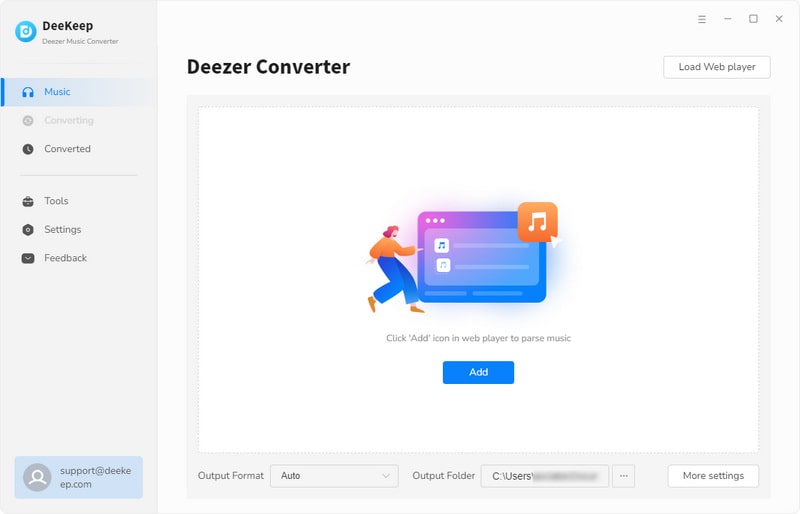
At first, get DeeKeep Deezer Music Converter installed on your computer without any ads. 48 languages are available for users from different countries. Set the language according to your need. The Deezer app is not needed since DeeKeep can extract songs from the built-in Deezer Music Web Player directly.
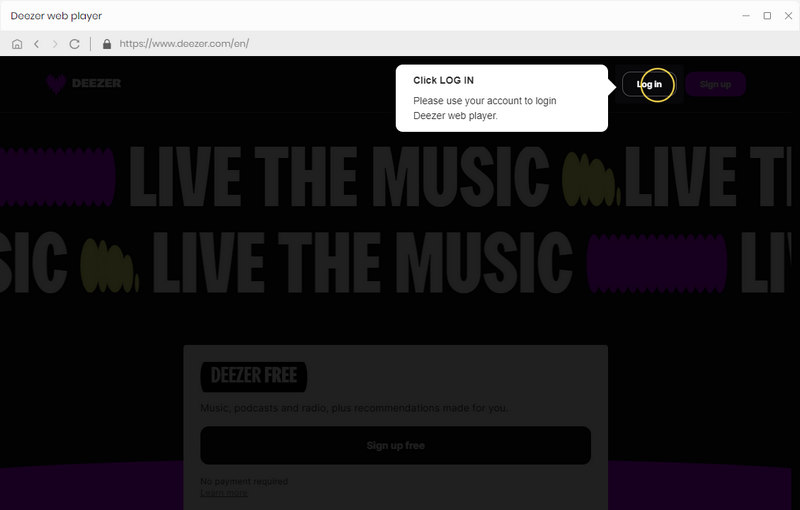
Step 2. Log in to Deezer Web Player.
The Deezer web player will start at the same time when you run DeeKeep on your computer. Then you are required to log in to Deezer Music.
Step 3. Customize the Output Settings
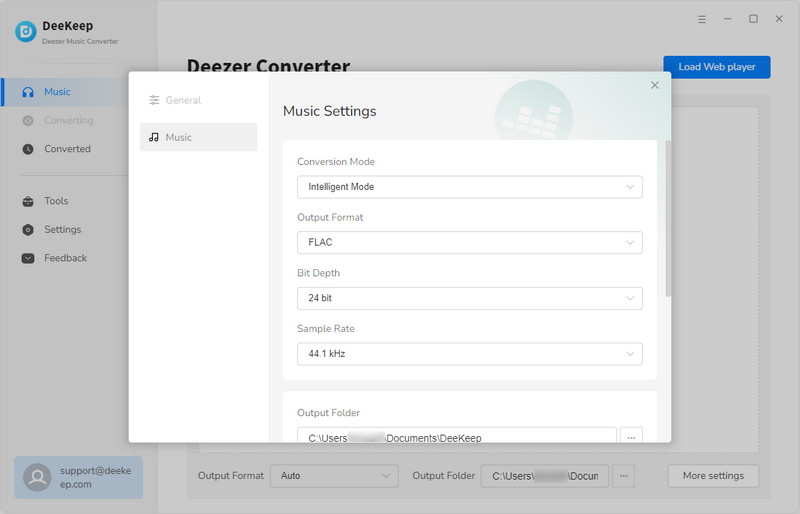
Before downloading music, go to the "Settings" tab on the lower left. Click it then a setting dialog appears. Here you are able to set the output format, bit rate (output quality), output folder, output file name and output organized manner. Set your output format to "FLAC". If you choose "Recommended" as the output format, the songs will be saved as original audio quality up to Hi-Fi.
Step 4. Choose Music and Playlists to Download
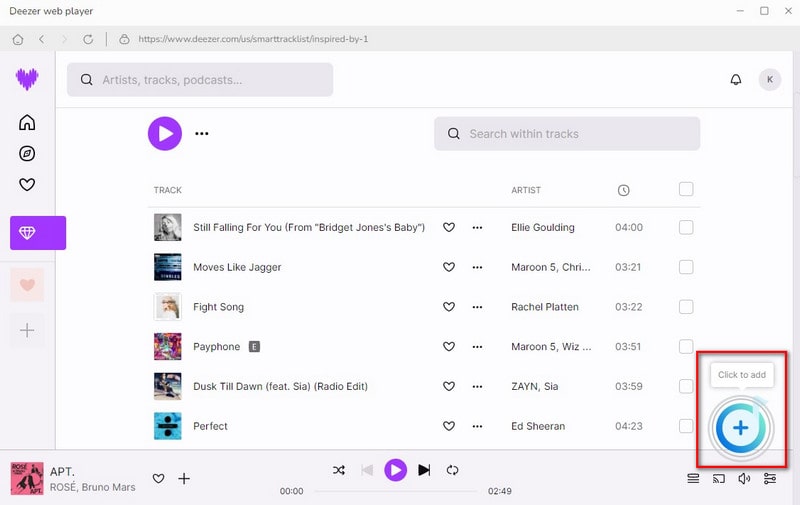
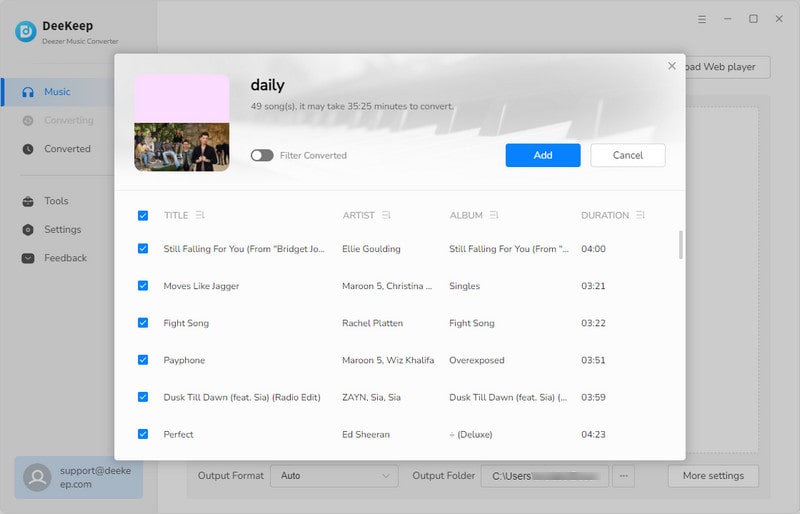
Open an album you need, then tap the "+ (Click to add)" button on the lower right. Then you will see a pop-up window. All songs from the music playlists are displayed. Select the songs you need and click "Add".
Step 5. Start Downloading Deezer Music to FLAC
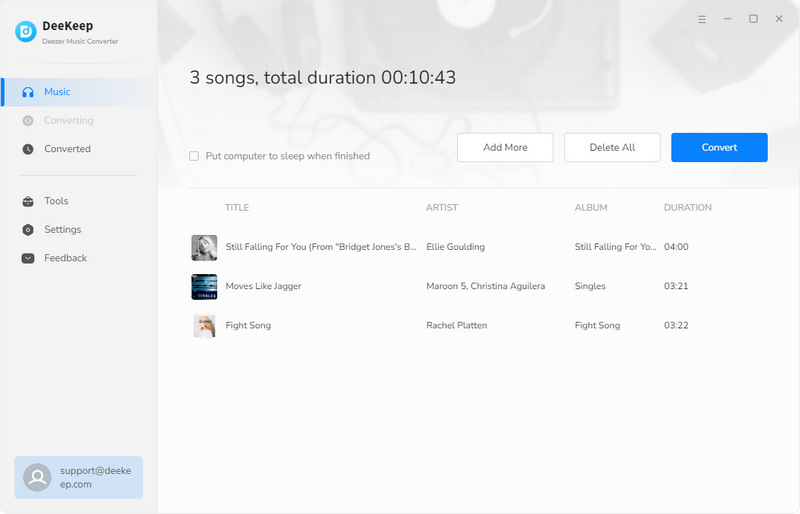
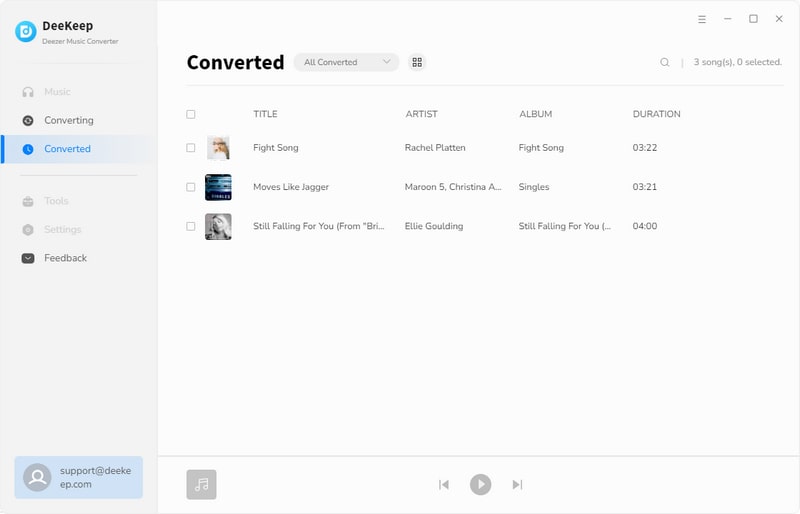
If you want to add more songs, click "Add More" to repeat the previous step. After finishing the previous step, you can click "Convert" button to start downloading. After a while, the selected songs are downloaded as Hi-Fi FLAC songs. Go to the left navigation bar, click the "History" to check all downloaded songs. In addition, the output folder will pop up automatically when the conversion is finished. Now you can enjoy free playback of Deezer Music and move the downloaded Deezer Music tracks to any device.
Part 4. Official Deezer Download vs. DeeKeep
Both methods let you listen to Deezer music offline, but they serve different purposes. If you only need temporary offline playback within the Deezer app, the official download feature works well. However, if you want to keep your music permanently or use it freely across different devices, a dedicated Deezer music converter offers much greater flexibility.
| Official Deezer Download | DeeKeep | |
|---|---|---|
| Offline Playback | ✔️ | ✔️ |
| Save as FLAC Files | ❌ | ✔️ |
| Keep Music After Subscription Ends | ❌ | ✔️ |
| Play Without Deezer App | ❌ | ✔️ |
| Transfer to USB/SD Card | ❌ | ✔️ |
| Best For | Temporary offline listening | Permanent music collection |
FAQs about Deezer Music to FLAC
Q1: Why can't I find the official Deezer downloads on my computer?
Official Deezer downloads are encrypted cache files stored for offline playback within the app. They aren't accessible as regular audio files.
Q2: What is the best output format for Deezer music?
It depends on your needs. FLAC is ideal for lossless audio quality, while MP3 is better if you want smaller file sizes and broader compatibility.
Q3: Can I transfer the downloaded FLAC files to a USB drive or SD card?
Yes. Once downloaded, the FLAC files are stored locally and can be copied to USB drives, SD cards, external hard drives, or other storage devices.
Summary
If the official Deezer download feature only meets your offline listening needs, there's no need for additional tools. However, if you'd like to keep your music after your subscription ends or play it on devices outside the Deezer app, saving your tracks as standard FLAC format provides greater flexibility. You can download the free trial below to see whether it fits your workflow before converting a larger music library.

Vernon Martin
Leveraging his deep expertise in the music entertainment industry, Vernon is dedicated to exploring the latest technological innovations and devices related to Deezer Music and sharing his discoveries with others.
 Amazon Music Downloader
 Spotify Music Downloader
 Apple Music Downloader
 Tidal Music Downloader
 YouTube Music Downloader
 Pandora Music Downloader
  Audible Converter
  Video Enhancer AI